Friday, January 14, 2011

Photo 365 Project: Day 7

IMG_0918
Day 7 (1/12/11): My New Baby

Didn't get a chance to go out, but I did get this bad boy in the mail today. I'd do a review on it but I don't think I understand enough about photography to have a significant say on the quality of the lens. Still, I can't wait to get out and shoot with this!

Tuesday, January 11, 2011

Photo 365 Project: Day 6

Day 6 (1/11/11): Motion Blurred Mints

Trying my hand at motion blur photography. I really want to get a handle for this technique so that I can start taking pictures of people with it. I managed to get a nice blur but the "motion" in the blur isn't as apparent. Expect (maybe) to see a couple more motion blur shots in the next couple (or even more) days. I sharpened the Andes mints (as my focus needs work) but I left the background alone this time.

Photo 365 Project: Day 5

Day 5 (1/10/11): Merry Christmas?

Snapped the tree one last time before it's taken down. Yes we still had our Christmas tree up in January, so sue us :) Had to do a lot of sharpening, I guess my f stop was too low (high?).

Monday, January 10, 2011

Photo 365 Project: Day 4

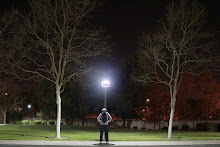
Day 4 (1/9/11): Hyphy in the Dark Ronald (First attempt at HDR)

Went out to the Community Center parking lot to take this picture at night. Set up my tripod to a 10 second timer, took 3 pictures (-2, 0, and +2 exposure) and stacked them all together to get this. Fun, but now I want to take some HDR pictures in the daytime to get more of an HDR effect. Still, this was pretty cool and I look forward to more night time shooting :)

*And for those of you in the know, yes, I am wearing my BARF!

Photo 365 Project: Day 3

Day 3 (1/8/11): Serious Sarah

Skipped a day. Meh, it was bound to happen! Got this shot inside of a Starbucks while they were waiting for their drinks. Looked amazing on my 3 inch LCD on the camera, but once I uploaded it I noticed that her face was VERY blurry. Still, I loved the shot, so I edited it until I got it to something I liked. I sharpened around the blurs as best I could, blurred out the background as much as I could (to make her face look sharper) and added a "vintage" color scheme over the picture, since vintage pictures have a natural "blur" to them haha. This was the final product, enjoy!

Thanks to Sarah for patiently staring at something while I shoot haha.

Photo 365 Project: Day 2

Day 2 (1/6/11): Photo Bomb

I set up my new tripod to play around with, and I was focusing on my garbage can. Right before I pressed the shutter button my sister jumps right in front of the camera, giving me this shot. Luckily it was a good one. A little editing to brighten her face, and you have Day 2 of my Photo 365 Project!

Photo 365 Project: Day 1

Yes, I know I didn't start on 1/1/11, and realistically I probably will not have around 365 pictures by the end of 2011, but I'm going to try my best to upload as many as I can. Starting.... now!!!

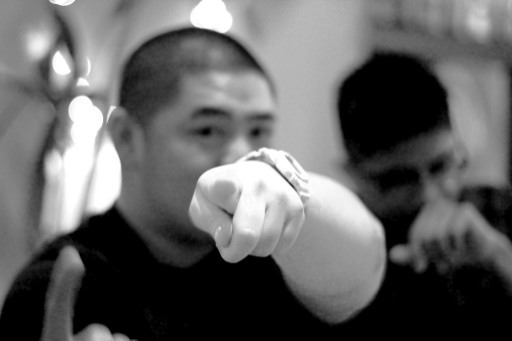
Day 1 (1/5/11): The Finger

The picture is really grainy, but I still like the picture a lot for some reason. My white balance was set to something completely different (I think 'Shade', I forgot to change it since we set foot in the restaurant). As a result a lot of my pictures from that night were way off in color, so I had to edit a lot of them. In addition my shutter speeds were way too slow, or my hands were way too shaky. It was my first night out with my t2i and it should be very fun (or depressing) to look back on this in a year from now :)

Thanks to David for giving me a great expression and a really fun shot!